跳至内容

博客列表

Donkey Car详解(1) – 组装

Donkey Car

概述

Donkey Car是2016年10月由美国人Adam Conway(Twitter)主导的一个人工智能自动驾驶模型车项目,由于近几年来人工智能技术和自动驾驶技术逐渐兴起,这个自动驾驶项目也受到越来越多爱好者关注和加入,逐渐形成了DonkeyCar社群。

本教程目标是帮助DonkeyCar初学者快速上手,如果有问题或建议,欢迎拍砖。

选择车架

最初的Donkey Car是通过改装“Exceed”牌1/16四驱玩具车而成,官方文档推荐一下四个型号:

以上四款小车的电子驱动模块都是一样的,它们但区别在于轮胎和安装顶盖的方式。需要提醒的是Desert Monster,Short Course Truck和Blaze需要增加一个适配器来固定Donkey Car主板和把手,可以在玩具店购买或者自己打印。因为这些小车都是标准配置,基本上是即插即用的。这些小车都有有刷电机版本和无刷电机版本,作者说使用有刷电机版的车架更容易训练,因为有刷电机更适合在粗糙的路面驾驶,也更便宜。

后来玩具们开始改装1/10的玩具车,1/10的车子变得更大,升级成Doneky Car专业版。当然专业版的Donkey Car性能更好,价格也更贵,以下是支持的型号:

  • HobbyKing Trooper (非专业版) 链接
  • HobbyKing Mission-D 链接
  • Tamaya TT01或者它的山寨版,这款容易购买,但需要散件安装,有一定难度。

因为完专业版的DonkeyCar的人比普通版的少,因为专业版存在文档不足的问题,如果你要开始完Donkey Car Pro,你应该具备一定的动手能力和更多的耐性。

所需零件

根据不同主板的支持,Donkey Car有两个版本,一款是使用树莓派(Raspberry Pi)的Donkey Car,另一款是使用Jetson Nano的Donkey Car。两个版本除了主板不同,所需的配件和软件的安装也是不一样的。

选项1 – 你可以通过Donkey Car官方渠道购买

如果你在美国,可以到原作者的Donkey store商店购买。

如果你在亚洲,你可以选择香港的Robocar Store,或者中国大陆的Robocar Store China购买。

官方套件或整车包括

零件大约成本
车架(来自上面的玩具车)大约¥600
电池及充电器大约¥120
树莓派 3b+大约¥300
128G SD卡大约¥120
其他配件大约¥600 – ¥875

选项2 – 你可以通过零件清单购买

如果你需要自己购买零部件,你可以参考作者的链接。值得提醒的是,如果你要自己组装,是需要通过3D打印机打印Donkey Car的零部件。如果你没有3D打印机,可以到红菜3D选购一台。

具体要准备的打印零部件,可以参考官方文档,

Jetson Nano升级

如果你想你小车跑得更快,你可以选择具有GPU的Jetson Nano作为主板,除了需要换主板意外,你还需要另外准备一个Jetson Nano的主板适配器还有Jetson Nano的网卡和Jetson Nano适用的摄像头(可参考这篇文章)

JetsonNano适配器

Jetson Nano 适配器

JesonNano扩展板

注意Jetson Nano的pin口布局和树莓派相反,使用其他扩展板时要注意。

电池

我们强烈建议使用聚合物锂电池,因为聚合物锂电池的能量密度更高,而且电压下降曲线更平滑,因而电压更稳定。

Battery

硬件

如果你从官方商店购买Donkey Car,你可以跳过前两步。

第一步 打印零部件

如果你没有3D打印机,可以在我们的商店购买打印好的零部件,或者寻找第三方打印。如果使用 PLA打印,层高设置可以选择2mm,填充率30%,打印一套零部件,估计需要2天时间左右,这是模型的下载链接

第二步 清理零部件

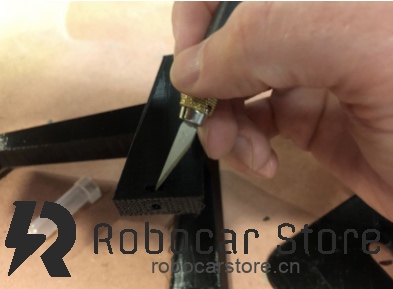
所有的3D打印件都需要做一点清理,包括重新钻孔,清理拉丝等。

robocarstore/17380757722502808

robocarstore/17380757862515729

第三步 安装底板和手提支架

安装步骤是相当简单的,你只需要使用M3螺丝把底板和手提把手连接起来。你要确保螺丝上紧了,因为你会使用手提支架提起小车。

第四步 连接舵机控制器

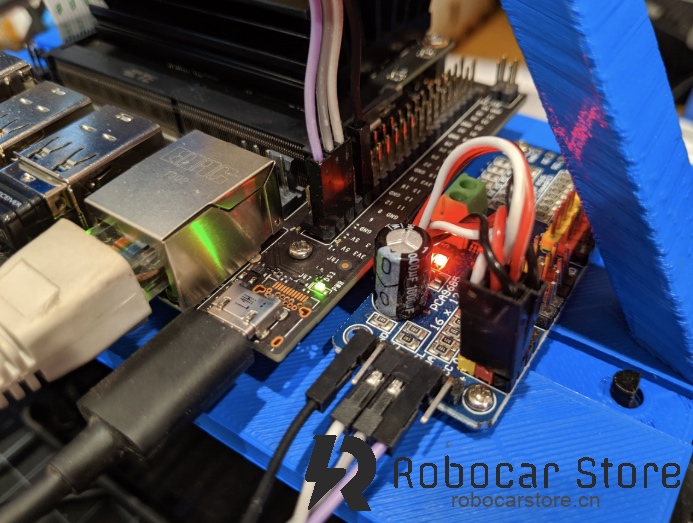
你可以把电路板安装上底板上再做连线,连线入下图所示。

robocarstore/173807580225062010

robocarstore/173807581725157711

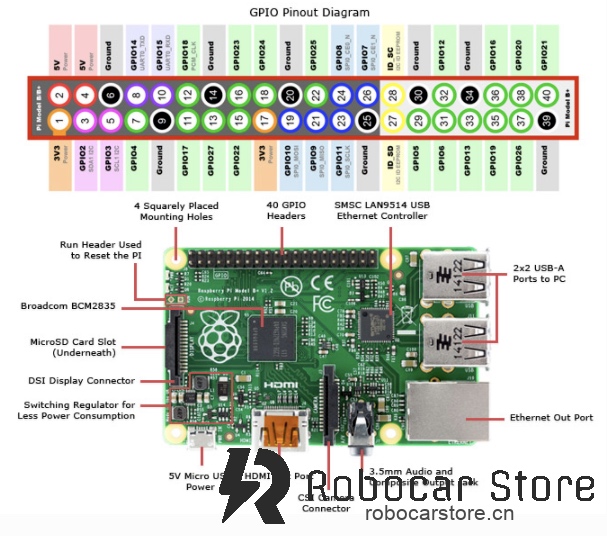
这是树莓派的布局图,你需要连接3.3v、两个I2C pin (SDA和SCL) 和 Ground(接地)

第五步 将树莓派安装到底板上

在这个时候,你可以把已经烧录好的SD卡插入树莓派卡槽。然后把树莓派和舵机连通过螺丝安装到底板上。这时需要使用M2.6的螺丝。

(加图片)

第六步 安装摄像头

先把摄像头的数据线连接好,然后安装到手提支架到前方,如下图:

注意树莓派到安装方向,如果摄像头前有薄膜保护,记得要把保护膜撕掉以免影响训练效果。

第七步 安装到车架上

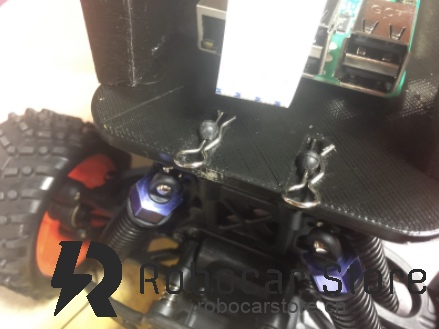
使用R型扣把底板固定在车架上,然后连接上电源线。

robocarstore/173807583625096212

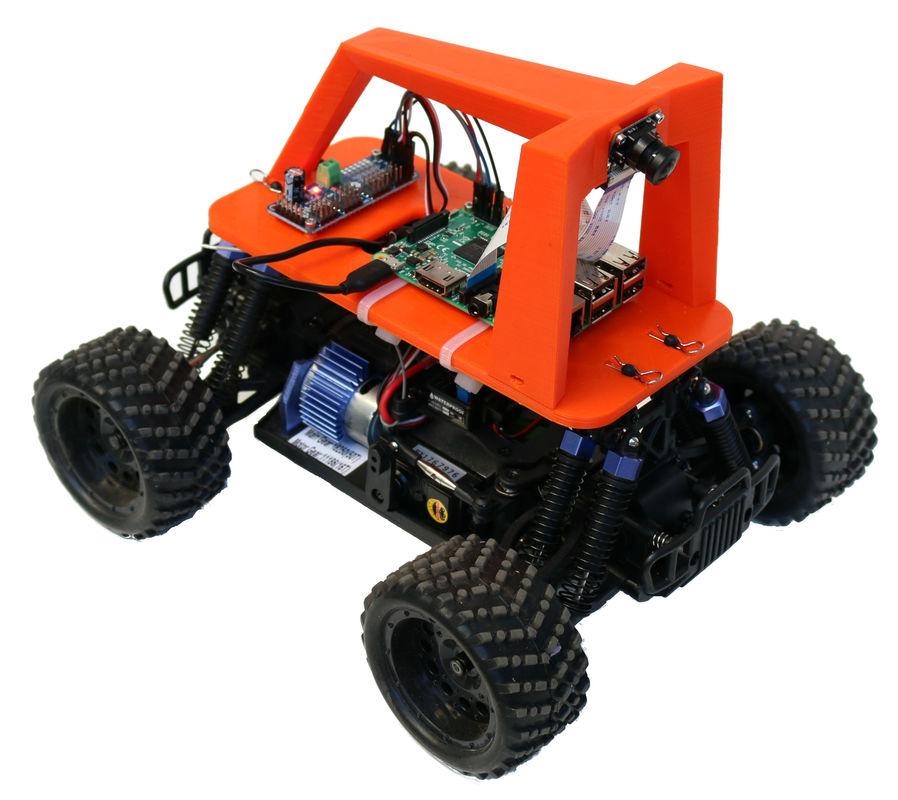
恭喜你,你的小车安装完成!

要驱动你的小车,你就需要继续参考下一篇文章软件安装部分

Introducing Donkey Car!

Donkey Car

Donkey Car is an open-source, small-scale DIY autonomous driving platform, and it might be your best entry-level AI learning platform. Donkey is a high-level autonomous driving library written in Python, characterized by its ability to help you quickly learn machine learning, experiment rapidly, and integrate applications of computer vision and machine learning tools (such as tornado, keras, tensorflow, opencv, etc.).

What is Donkey Car?

Donkey Car is a Python-based open-source project designed to help users build and train autonomous vehicles. It is intended to allow users to easily experiment with autonomous driving technology at home or in a lab. The hardware part of Donkey Car typically consists of a small remote-controlled car, a Raspberry Pi, a camera, and a battery. The software part is a powerful Python library that supports multiple machine learning frameworks.

Why Choose Donkey Car?

  1. Easy to Get Started: Donkey Car is designed to be very intuitive, allowing even those without programming experience to get started quickly. It provides detailed documentation and tutorials to guide users through the entire process from hardware assembly to software configuration.

  2. Community Support: As an open-source project, Donkey Car has an active community. Whatever issues you encounter, you can find answers or seek help within the community.

  3. Flexibility: Donkey Car supports multiple machine learning frameworks, such as TensorFlow and Keras, allowing users to choose the right tools for their experiments based on their needs.

  4. Cost-Effective: Compared to other autonomous driving platforms, Donkey Car is relatively low-cost, making it ideal for hobbyists and educational institutions.

How to Get Started?

To start using Donkey Car, you need to prepare the following materials:

  • A small remote-controlled car
  • Raspberry Pi
  • Camera
  • Battery
  • 3D printed car frame (optional)

Next, you can follow the official documentation to assemble the hardware and install the software. Donkey Car's official GitHub page provides detailed installation steps and example code to help you quickly build your own autonomous vehicle.

Conclusion

Donkey Car is a project well-suited for AI beginners. Through this platform, you can learn the basic principles of autonomous driving and master the fundamentals of machine learning and computer vision. Whether you want to enter the AI field or are simply interested in autonomous driving technology, Donkey Car is an ideal starting point.

I hope this article helps you better understand Donkey Car and inspires your interest in autonomous driving technology. Join the Donkey Car community and start your AI learning journey today!

Donkey Car Detailed Explanation (1) – Assembly

Donkey Car

Overview

Donkey Car is an AI autonomous driving model car project led by Adam Conway (Twitter) since October 2016. With the rise of AI and autonomous driving technologies in recent years, this project has attracted more enthusiasts, forming the DonkeyCar community.

This tutorial aims to help DonkeyCar beginners get started quickly. If you have any questions or suggestions, feel free to provide feedback.

Choosing a Chassis

The original Donkey Car was modified from the "Exceed" brand 1/16 four-wheel-drive toy car. The official documentation recommends the following models:

These cars have the same electronic drive modules, differing only in tires and body mounting methods. Note that the Desert Monster, Short Course Truck, and Blaze require an adapter to secure the Donkey Car motherboard and handle, which can be purchased or 3D printed. These cars are standard configurations, mostly plug-and-play. They come in brushed and brushless motor versions; the author suggests using the brushed motor version as it's easier to train, better for rough surfaces, and cheaper.

Later, enthusiasts began modifying 1/10 scale toy cars, making them larger and upgrading to the Donkey Car Pro version. The Pro version offers better performance but at a higher cost. Supported models include:

  • HobbyKing Trooper (non-Pro) Link
  • HobbyKing Mission-D Link
  • Tamaya TT01 or its clones, which are easy to buy but require assembly, posing some difficulty.

Fewer people use the Pro version due to documentation gaps, so if you start with Donkey Car Pro, you should have good hands-on skills and patience.

Required Parts

Donkey Car has two versions based on the mainboard: one using Raspberry Pi and the other using Jetson Nano. Apart from the mainboard, the required parts and software installation differ.

Option 1 – Purchase through Donkey Car official channels

If you're in the US, you can buy from the original author's Donkey store.

In Asia, you can choose Hong Kong's Robocar Store or mainland China's Robocar Store China.

Official kits or complete cars include:

PartApproximate Cost
Chassis (from the toy cars above)Approx. ¥600
Battery and ChargerApprox. ¥120
Raspberry Pi 3b+Approx. ¥300
128G SD CardApprox. ¥120
Other AccessoriesApprox. ¥600 – ¥875

Option 2 – Purchase parts individually

If you need to buy parts individually, refer to the author's links. Note that if you assemble it yourself, you'll need to 3D print Donkey Car parts. If you don't have a 3D printer, consider buying one from Beets3D.

For specific printed parts, refer to the official documentation, link.

Jetson Nano Upgrade

For faster performance, choose Jetson Nano with a GPU as the mainboard. Besides changing the mainboard, you'll need a Jetson Nano adapter, network card, and compatible camera (see this article).
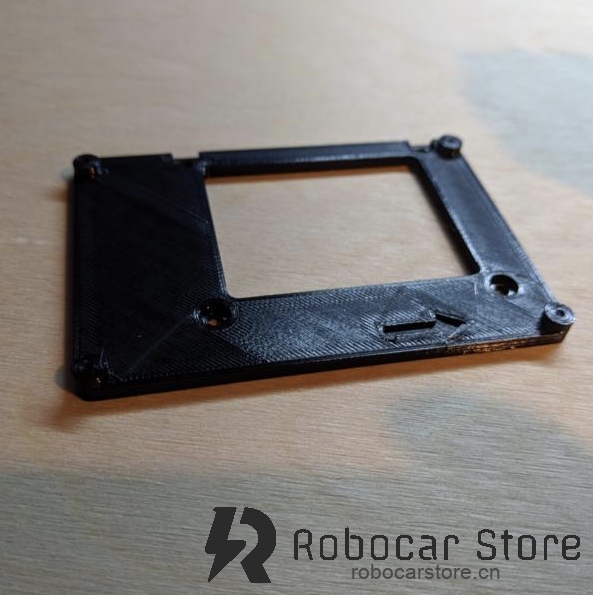
JetsonNano Adapter

Jetson Nano Adapter

JetsonNano Expansion Board

Note that Jetson Nano's pin layout is opposite to Raspberry Pi's, so be careful when using other expansion boards.

Battery

We strongly recommend using lithium polymer batteries for their higher energy density and smoother voltage drop curve, providing more stable voltage.
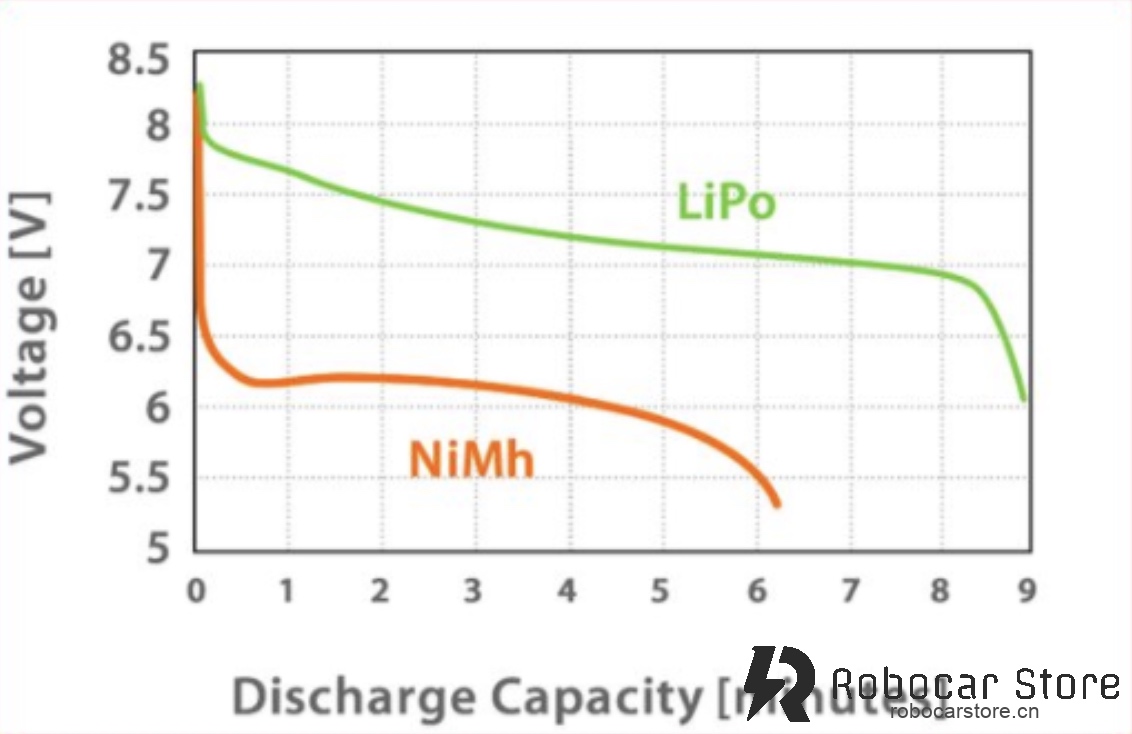
Battery

Hardware

If you purchased Donkey Car from the official store, you can skip the first two steps.

Step 1: Print Parts

If you don't have a 3D printer, buy printed parts from our store or find a third-party printer. For PLA printing, set layer height to 2mm and infill to 30%. Printing a set of parts takes about 2 days. Here's the model download link.

Step 2: Clean Parts

All 3D printed parts need some cleaning, including re-drilling holes and removing strings.
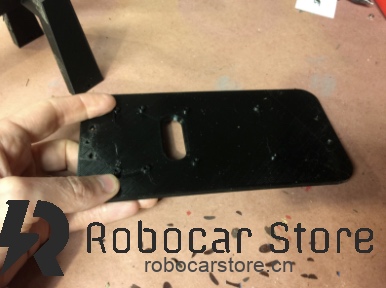
robocarstore/17380757722502808

robocarstore/17380757862515729

Step 3: Install Baseplate and Handle

The installation is straightforward; use M3 screws to connect the baseplate and handle. Ensure the screws are tight, as you'll use the handle to lift the car.

Step 4: Connect Servo Controller

Install the circuit board on the baseplate before wiring, as shown below.
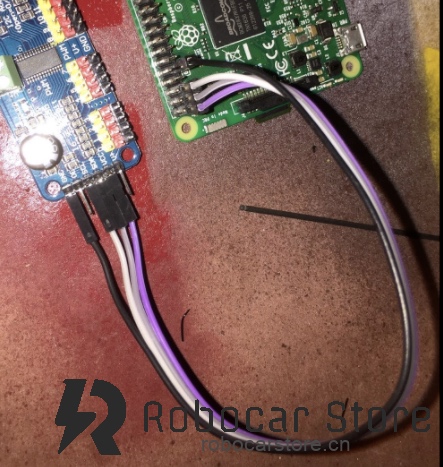
robocarstore/173807580225062010

robocarstore/173807581725157711

This is the Raspberry Pi layout. Connect 3.3v, two I2C pins (SDA and SCL), and Ground.

Step 5: Install Raspberry Pi on Baseplate

At this point, insert the pre-burned SD card into the Raspberry Pi slot. Then, mount the Raspberry Pi and servo controller on the baseplate using screws. Use M2.6 screws.

(Add image)

Step 6: Install Camera

Connect the camera cable, then mount it on the front of the handle, as shown:

Ensure the Raspberry Pi is installed correctly. If the camera has a protective film, remove it to avoid affecting training results.

Step 7: Mount on Chassis

Use R-clips to secure the baseplate to the chassis, then connect the power cable.
robocarstore/173807583625096212

Congratulations, your car is assembled!

To drive your car, continue with the next article on software installation.