JetBot自定义赛道搭建指南
从材料选择到电路设计,手把手教你为NVIDIA JetBot搭建一条专业的自动驾驶测试赛道,包含视觉标记、障碍物和评分系统。
JetBot 赛道 DIY 自动驾驶 NVIDIA
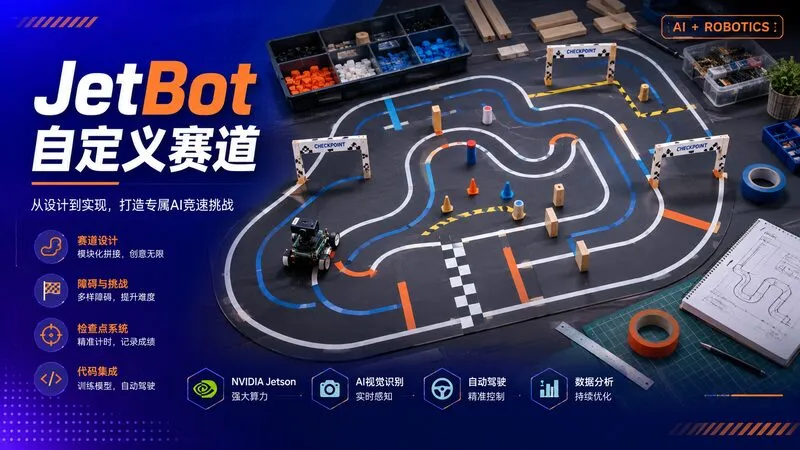
JetBot自定义赛道搭建指南
NVIDIA JetBot是一款基于Jetson Nano的教育机器人平台,专为AI学习设计。搭建一条标准化的测试赛道,能让你系统地评估自动驾驶算法的性能,进行可重复的实验对比。本文分享如何用低成本材料搭建一条功能完整的JetBot赛道。
赛道设计原则
尺寸规划
根据JetBot的传感器能力和运动性能,推荐以下尺寸:
| 参数 | 推荐值 | 说明 |
|---|---|---|
| 赛道宽度 | 60-80cm | 太窄容易冲出,太宽失去挑战 |
| 最小弯道半径 | 30cm | JetBot转弯能力的下限 |
| 直线段长度 | 1-2m | 足够加速和测试巡航 |
| 总长度 | 8-12m | 一圈约30-60秒 |
| 赛道形状 | 椭圆形+复杂弯道 | 兼顾基础测试和挑战性 |
赛道布局示例
    ┌─────────────────────────────────────┐
    │                                     │
    │    ┌───────────────────────────┐    │
    │    │                           │    │
    │    │    ┌─────────────────┐    │    │
    │    │    │                 │    │    │
    │    │    │   起点/终点线    │    │    │
    │    │    │                 │    │    │
    │    │    └─────────────────┘    │    │
    │    │                           │    │
    │    └───────────────────────────┘    │
    │                                     │
    └─────────────────────────────────────┘
材料清单
基础材料(约200-300元)
-
赛道边界
- 黑色电工胶带(5cm宽)× 5卷 —— 用于画赛道边线
- 白色电工胶带(5cm宽)× 2卷 —— 用于中心虚线
- 或:PVC地板贴膜(更耐用,约100元/卷)
-
赛道底板
- 选项A:直接在地板/瓷砖上贴胶带(最便宜)
- 选项B:白色PVC板(120×240cm,约50元/块)× 3-4块拼接
- 选项C:定制喷绘布(最专业,约200-400元)
-
障碍物和标记
- 交通锥 × 4-6个(或3D打印替代品)
- 彩色纸板(红、黄、绿)—— 用于交通标志
- 小纸盒 —— 模拟建筑物
-
电子元件
- RFID标签 × 5-10个 —— 检查点识别
- RFID读取器(RC522,约15元)
- 红外对管 × 若干 —— 精确位置检测
- LED灯带 —— 赛道照明(可选)
赛道搭建步骤
第一步:规划布局
用粉笔或可擦记号笔在地面画出赛道轮廓:
# track_planner.py - 生成赛道布局参数
import numpy as np
import matplotlib.pyplot as plt

def generate_track_layout():
    """生成赛道中心线坐标"""
    # 椭圆形 + 复杂弯道
    t = np.linspace(0, 2*np.pi, 1000)

    # 椭圆参数
    a, b = 2.0, 1.0  # 长轴、短轴(米)
    x = a * np.cos(t)
    y = b * np.sin(t)

    # 添加一个S弯
    s_curve_start = 150
    s_curve_end = 250
    s_amplitude = 0.3

    for i in range(s_curve_start, s_curve_end):
        phase = (i - s_curve_start) / (s_curve_end - s_curve_start)
        y[i] += s_amplitude * np.sin(2 * np.pi * phase)

    return x, y

x, y = generate_track_layout()

# 可视化
plt.figure(figsize=(10, 6))
plt.plot(x, y, 'k-', linewidth=2, label='中心线')
plt.plot(x, y, 'b--', linewidth=1, alpha=0.5, label='左边界')
plt.plot(x, y, 'r--', linewidth=1, alpha=0.5, label='右边界')
plt.grid(True)
plt.axis('equal')
plt.legend()
plt.title('赛道布局')
plt.savefig('track_layout.png', dpi=150, bbox_inches='tight')
print("布局图已保存到 track_layout.png")
第二步:贴赛道边线
- 清洁地面:确保表面无灰尘、油污
- 从直线段开始:直线比弯道容易对齐
- 使用直尺辅助:长直尺或拉线确保直线平直
- 弯道处理:
- 用柔性曲线尺或绳子辅助
- 胶带不要拉太紧,允许轻微弯曲
- 弯道处胶带重叠部分要平滑过渡
# 计算弯道处胶带的切割角度
def calculate_tape_angles(radius, tape_width=5):
    """
    计算弯道处胶带需要切割的角度
    radius: 弯道半径(cm)
    tape_width: 胶带宽度(cm)
    """
    # 内侧胶带不需要切割
    # 外侧胶带需要切割成梯形
    inner_circumference = 2 * np.pi * radius
    outer_circumference = 2 * np.pi * (radius + tape_width)

    # 每段胶带的长度(假设分成8段)
    segments = 8
    inner_length = inner_circumference / segments
    outer_length = outer_circumference / segments

    # 切割角度
    angle = np.arctan((outer_length - inner_length) / tape_width)
    angle_deg = np.degrees(angle)

    print(f"弯道半径: {radius}cm")
    print(f"外侧胶带需要切割成梯形")
    print(f"切割角度: {angle_deg:.1f}°")

    return angle_deg

calculate_tape_angles(radius=30, tape_width=5)
第三步:添加视觉标记
JetBot的摄像头需要清晰的视觉参考。添加以下标记:
# marker_generator.py - 生成赛道标记图案
import cv2
import numpy as np

def create_checkpoint_marker(size=200, marker_id=1):
    """创建检查点标记(ArUco风格)"""
    marker = np.ones((size, size, 3), dtype=np.uint8) * 255

    # 黑色边框
    border = 20
    cv2.rectangle(marker, (0, 0), (size-1, size-1), (0, 0, 0), border)

    # 内部图案(根据ID生成不同图案)
    np.random.seed(marker_id)
    pattern = np.random.randint(0, 2, (5, 5))
    cell_size = (size - 2*border) // 5

    for i in range(5):
        for j in range(5):
            if pattern[i, j]:
                x1 = border + j * cell_size
                y1 = border + i * cell_size
                x2 = x1 + cell_size
                y2 = y1 + cell_size
                cv2.rectangle(marker, (x1, y1), (x2, y2), (0, 0, 0), -1)

    return marker

# 生成多个检查点标记
for i in range(1, 6):
    marker = create_checkpoint_marker(size=200, marker_id=i)
    cv2.imwrite(f'checkpoint_{i}.png', marker)
    print(f"生成检查点标记 {i}")
第四步:安装电子检测系统
用RFID或红外对管实现精确的位置检测:
# rfid_checkpoint.py - RFID检查点检测
import RPi.GPIO as GPIO
from mfrc522 import SimpleMFRC522
import time

class RFIDCheckpoint:
    def __init__(self, reader_id):
        self.reader = SimpleMFRC522()
        self.reader_id = reader_id
        self.last_read = None
        self.cooldown = 2  # 防止重复读取(秒)

    def read(self):
        """非阻塞读取"""
        now = time.time()
        if self.last_read and (now - self.last_read) < self.cooldown:
            return None

        try:
            id, text = self.reader.read_no_block()
            if id:
                self.last_read = now
                return {'reader_id': self.reader_id, 'tag_id': id, 'text': text}
        except:
            pass
        return None

# 主循环
checkpoints = [
    RFIDCheckpoint(0),
    RFIDCheckpoint(1),
    RFIDCheckpoint(2),
]

lap_times = []
current_lap_start = None
last_checkpoint = None

print("赛道检测系统启动")
print("等待JetBot通过检查点...")

try:
    while True:
        for cp in checkpoints:
            result = cp.read()
            if result:
                print(f"[检查点{result['reader_id']}] 检测到标签: {result['tag_id']}")

                # 记录圈速
                now = time.time()
                if result['reader_id'] == 0:  # 起点/终点
                    if current_lap_start:
                        lap_time = now - current_lap_start
                        lap_times.append(lap_time)
                        print(f"✓ 完成一圈!用时: {lap_time:.2f}秒")
                        print(f"  平均圈速: {np.mean(lap_times):.2f}秒")
                    current_lap_start = now

                last_checkpoint = result['reader_id']

        time.sleep(0.1)

except KeyboardInterrupt:
    print("\n检测系统停止")
    GPIO.cleanup()
赛道评分系统
搭建评分系统来量化自动驾驶性能:
# scoring_system.py
import time
import numpy as np
from dataclasses import dataclass
from typing import List

@dataclass
class LapRecord:
    lap_number: int
    time: float
    checkpoints: List[int]
    collisions: int
    off_track: int

class TrackScoringSystem:
    def __init__(self, total_checkpoints=5):
        self.total_checkpoints = total_checkpoints
        self.records: List[LapRecord] = []
        self.current_lap_checkpoints = []
        self.lap_start_time = None
        self.collisions = 0
        self.off_track_count = 0

    def start_lap(self):
        """开始新一圈"""
        self.lap_start_time = time.time()
        self.current_lap_checkpoints = []
        self.collisions = 0
        self.off_track_count = 0

    def pass_checkpoint(self, checkpoint_id):
        """通过检查点"""
        if checkpoint_id not in self.current_lap_checkpoints:
            self.current_lap_checkpoints.append(checkpoint_id)
            print(f"✓ 通过检查点 {checkpoint_id}")

    def detect_collision(self):
        """检测到碰撞"""
        self.collisions += 1
        print(f"⚠ 碰撞!累计: {self.collisions}")

    def detect_off_track(self):
        """检测到偏离赛道"""
        self.off_track_count += 1
        print(f"⚠ 偏离赛道!累计: {self.off_track_count}")

    def finish_lap(self):
        """完成一圈"""
        if self.lap_start_time is None:
            return

        lap_time = time.time() - self.lap_start_time
        checkpoints_hit = len(self.current_lap_checkpoints)

        record = LapRecord(
            lap_number=len(self.records) + 1,
            time=lap_time,
            checkpoints=self.current_lap_checkpoints.copy(),
            collisions=self.collisions,
            off_track=self.off_track_count
        )
        self.records.append(record)

        # 计算得分
        score = self.calculate_score(record)

        print(f"\n{'='*50}")
        print(f"第 {record.lap_number} 圈完成")
        print(f"用时: {record.time:.2f}秒")
        print(f"检查点: {checkpoints_hit}/{self.total_checkpoints}")
        print(f"碰撞: {record.collisions}")
        print(f"偏离赛道: {record.off_track}")
        print(f"得分: {score:.1f}/100")
        print(f"{'='*50}\n")

    def calculate_score(self, record: LapRecord) -> float:
        """
        评分规则:
        - 基础分:100分
        - 时间惩罚:每超过目标时间1秒扣2分
        - 检查点奖励:每个检查点+5分
        - 碰撞惩罚:每次-10分
        - 偏离惩罚:每次-5分
        """
        target_time = 30.0  # 目标圈速(秒)

        score = 100.0

        # 时间评分
        time_diff = record.time - target_time
        if time_diff > 0:
            score -= time_diff * 2

        # 检查点奖励
        checkpoint_bonus = len(record.checkpoints) * 5
        score += checkpoint_bonus

        # 碰撞惩罚
        score -= record.collisions * 10

        # 偏离惩罚
        score -= record.off_track * 5

        return max(0, min(100, score))

    def print_summary(self):
        """打印总体统计"""
        if not self.records:
            print("暂无数据")
            return

        times = [r.time for r in self.records]
        scores = [self.calculate_score(r) for r in self.records]

        print("\n" + "="*60)
        print("总体统计")
        print("="*60)
        print(f"总圈数: {len(self.records)}")
        print(f"平均圈速: {np.mean(times):.2f}秒")
        print(f"最快圈速: {np.min(times):.2f}秒")
        print(f"平均得分: {np.mean(scores):.1f}")
        print(f"最高得分: {np.max(scores):.1f}")
        print("="*60 + "\n")

# 使用示例
scorer = TrackScoringSystem(total_checkpoints=5)

# 模拟一圈
scorer.start_lap()
time.sleep(1)
scorer.pass_checkpoint(1)
time.sleep(2)
scorer.pass_checkpoint(2)
time.sleep(1)
scorer.detect_off_track()
time.sleep(2)
scorer.pass_checkpoint(3)
time.sleep(3)
scorer.pass_checkpoint(4)
time.sleep(2)
scorer.pass_checkpoint(0)  # 回到起点
scorer.finish_lap()

scorer.print_summary()
赛道维护和安全
日常维护
- 胶带检查:每周检查胶带是否翘起、磨损
- 清洁:用干布擦拭赛道表面,避免湿滑
- 标记更新:每月更换褪色的视觉标记
- 电子系统:检查RFID读取器灵敏度,更换电池
安全注意事项
- 速度限制:新手阶段限制在0.3-0.5m/s
- 碰撞缓冲:JetBot四周贴泡棉,减少碰撞损伤
- 紧急停止:准备物理急停开关
- 电池监控:电压低于3.3V立即停止,防止过放
扩展功能
搭建好基础赛道后,可以添加:
- 动态障碍物:用舵机控制的移动障碍物
- 交通信号灯:LED + 颜色识别挑战
- 坡道:测试爬坡能力和速度控制
- 夜间模式:关闭室内灯,用LED赛道测试低光性能
- 多车竞技:两条并行赛道,对比不同算法
成本总结
| 项目 | 成本 |
|---|---|
| 胶带/贴膜 | 50-150元 |
| PVC底板(可选) | 150-200元 |
| RFID系统 | 50-80元 |
| 障碍物/标记 | 30-50元 |
| 总计 | 280-480元 |
一条好的赛道是自动驾驶学习的基石。它让你能定量评估算法改进的效果,进行可重复的实验,而不是凭感觉判断”好像好一点了”。花一个周末搭建赛道,后续的训练效率会大幅提升。